FinOps · Cost Optimization

Cloud FinOps That Pays for Itself

Cloud bills shouldn't be a mystery you solve after the invoice lands. See every dollar of spend across AWS, Azure and Google Cloud, catch waste before it costs you, and know exactly what your Kubernetes workloads really cost — down to the pod.

Multi-Cloud - AWS, Azure, GCP, K8s 20–30% Typical Run-Rate Savings
Agentless Setup in Minutes 7-Day Free Trial
65%
idle spend cut
3
clouds, 1 view
24/7
monitoring
Your Cloud · At a Glance
live
Cost Visibility & Allocation 100% visible
Cloud Cost Anomaly Detection real-time
Global Inventory 1,284 res
Scheduled Stop/Start 42 active
Access & Roles tag-based
Kubernetes Cost $9.4k / mo
Security Audit Grade A
Cloud Spend $48.2k / mo
How it connects — agentless FinOps automation

How Does Clouds Analytics Connect to My Cloud?

Agentless. Nothing to install. Connect with a single trust policy — no agents, no software on your instances, no network changes. Live today for AWS and Azure.

Your Cloud Account
Secure Trust Policy
Clouds Analytics
Read-only by default Start/stop only write action Revoke anytime
Capabilities — cloud cost management software

What Can a FinOps Platform Do for Your Cloud Spend?

Global Inventory

See any service running on your cloud

Global Inventory automatically discovers every service running across your clouds — compute, databases, storage, networking, containers, serverless and more — across AWS, Azure and Google Cloud, in every account and region, in one searchable view.

VMs, RDS & databases, buckets, load balancers, Auto Scaling groups, containers & functions — all of it.
Agentless, multi-cloud discovery — filter by tag, account, region, owner or cost.
Live running/stopped state, so you spot idle, untagged and orphaned resources instantly.
Explore inventory
global-inventory · 1,284 resources
AWS
prod-api-01
EC2 · m5.large
us-east-1running
AZ
analytics-db
SQL · GP_Gen5
eastusrunning
AWS
staging-rds
RDS · db.t3.med
eu-west-1stopped
GCP
ml-worker-pool
MIG · 6 nodes
us-central1running
AWS
assets-cdn
S3 · 4.2 TB
globalactive
GCP
image-resize-fn
Function · 2nd gen
us-central1running
Resource Scheduler

Schedule stop & start — and stop paying for idle time

Define when resources should run. Clouds Analytics powers them down nights, weekends and holidays, then brings them back before your team logs on. Non-production rarely needs to run 24/7 — so why pay for it?

Works on VMs / EC2, RDS databases and Auto Scaling groups.
Tag-based schedules — apply one policy to hundreds of resources.
Time-zone aware, with one-click override when you need to stay on.
VM / EC2 RDS Auto Scaling
scheduler · tag:env=staging
env = staging · 38 resources
$11,940
saved / mo
MTWTFSS Day Eve Night
Running Stopped (auto)
Access Control

Tag-based & resource-based access for every user

Give people exactly the access they need — no more, no less. Grant rights by tag (e.g. team:payments) or by specific resource, so each user can view, schedule and manage only their own cloud resources.

Tag-based access: rules follow resources automatically as they're created.
Resource-based access: pin permissions to named resources or accounts.
Scoped actions — view, schedule, start/stop — with a full audit trail.
See access controls
access-control · roles & scopes
PA
Payments Team
8 users
tag: team=paymentsstart/stop
DE
Dev — Sandbox
23 users
tag: env=devschedule
DB
DBA Group
4 users
res: prod-rds-*manage
FN
FinOps
5 users
all accountsview-only
Optimization

Smart recommendations that save you even more

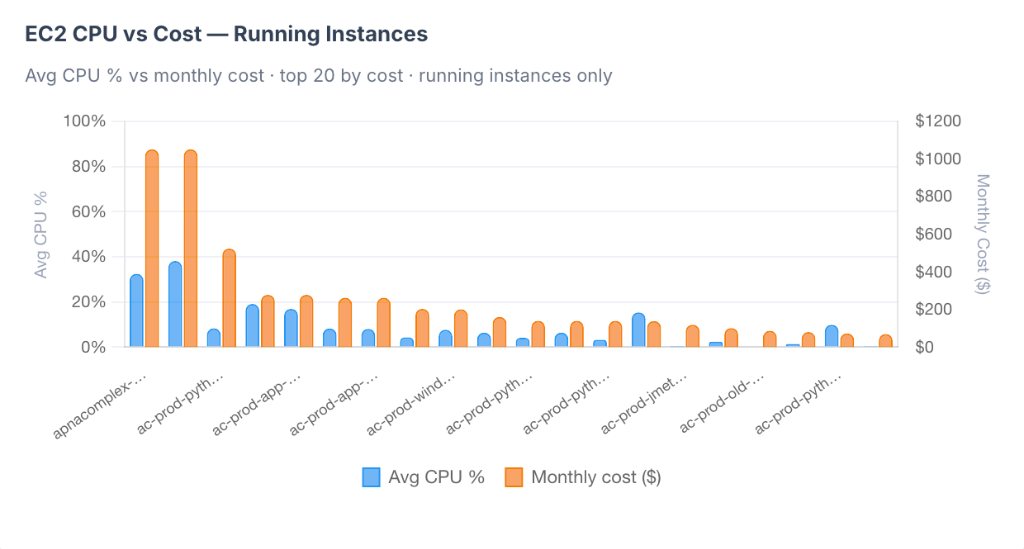
Scheduling cuts idle time — optimization cuts the rest. Clouds Analytics studies how each resource is actually used and recommends the right size, so you stop paying for capacity you never touch.

Rightsizing from real metrics — p95, p99 and CPU / memory utilization, not guesswork.
Flags over-provisioned and idle VMs, RDS & nodes with a clear dollar saving for each.
One-click apply or export as code — every change safe and reversible.
See recommendations
optimization · 18 recommendations
rightsizing · usage p95/p99
$3,420
extra saving / mo
prod-api-01
m5.xlargem5.large
−$86 / mo
CPU p95 34%p99 51%
analytics-db
r5.2xlarger5.xlarge
−$310 / mo
CPU p95 41%p99 63%
ml-worker-pool
n2-std-8n2-std-4
−$192 / mo
CPU p95 27%p99 46%
Kubernetes

Kubernetes cost, down to the pod

See exactly what your clusters cost — across Amazon EKS and Azure AKS — broken down by cluster, namespace, workload and pod, at a glance. Spot idle nodes and over-requested pods, then right-size for real savings.

Unified EKS & AKS spend in one view — no per-cluster digging.
Cost per namespace, workload & pod at a glance.
Find idle nodes and over-provisioned requests & limits.
Explore Kubernetes cost
k8s-cost · cost by namespace
4 clusters · 312 pods
$2,180
idle / mo
EKS
payments
prod-eks · 48 pods
us-east-1$3,420/mo
EKS
checkout
prod-eks · 26 pods
us-east-1$2,110/mo
AKS
search
eu-aks · 64 pods
westeurope$4,260/mo
AKS
batch-jobs
eu-aks · 12 idle
westeurope−$2,180/mo
Security Audit

Continuous security audit of your cloud

We audit how your cloud resources are configured — across every account and cloud — against security best practices and CIS benchmarks, and surface misconfigurations before they ever become incidents.

Continuous checks against CIS benchmarks & best practices.
Flags public buckets, open ports, weak IAM & unencrypted data.
Severity-ranked findings with clear, actionable fixes.
See security audit
security-audit · CIS benchmark
1,284 resources scanned
A
96 / 100
S3 bucket publicly readable
assets-cdn · us-east-1
Critical
Security group open 0.0.0.0/0 :22
prod-api · sg-0a91
High
RDS not encrypted at rest
analytics-db
High
IAM MFA enforced
all accounts
Passed
Cost Visibility

Cost Visibility & Allocation

Get 100% visibility into your cloud bill. Attribute costs across AWS, Azure, and Google Cloud by account, team, service, or business unit. Stop guessing who owns what resource.
Multi-cloud cost allocation by account, team, service, unit.
Detailed breakdowns by service, environment, and owner tags.
Cost Visibility & Allocation
Anomaly Detection

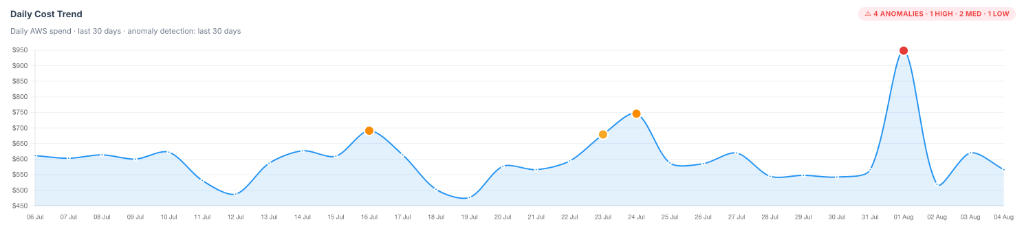
Cloud Cost Anomaly Detection

Never get surprised by your cloud bill again. Our machine learning anomaly detection engine constantly monitors your cloud spend, detecting sudden spikes, drift, and unexpected resource creation in real-time.
Real-time machine learning detection of sudden spend spikes and drift.
Instant notifications via Slack, Microsoft Teams, or email.
Cloud Cost Anomaly Detection
Problems we fix — cloud waste reduction

How Does a FinOps Tool Reduce Cloud Waste?

Problem Fix
Surprise Bill Spikes Fixed by cost anomaly detection + alerts → no more bill shock
No Cost Accountability Fixed by showback/chargeback → cost ownership per team
Idle & Oversized Resources Fixed by rightsizing + idle detection → lower run-rate
RI/SP Guesswork Fixed by coverage analysis → max discount, min waste
Finance Can't Forecast Spend Fixed by cloud spend forecasting → predictable spend
Untagged Resources Hide Cost Fixed by tag enforcement → 100% cost attribution
Kubernetes Cost Is a Black Box Fixed by K8s cost per pod → container transparency
Multi-Cloud Data Fragmented Fixed by multi-cloud cost allocation → single source of truth
The Platform

One Platform for Your Whole Cloud

From cost to security to performance — every signal your cloud produces, in one clear view.

Cloud Cost Analytics
Track spending across services, projects, teams and accounts in real time.
Optimization & Rightsizing
Rightsize VMs and databases from real p95 / p99 and CPU usage to save even more.
Resource Scheduling
Automatically stop and start VMs, RDS and Auto Scaling groups on a schedule.
Access & Governance
Tag-based and resource-based access so the right people manage the right things.
Security Insights
Find risky settings, weak access, exposed services and unusual activity.
Reports & Alerts
Daily, weekly and monthly reports with alerts that actually matter.
65%
Idle Spend Cut
3+
Clouds Supported
24/7
Live Monitoring
2min
Agentless Setup
How It Works

From Connected to In Control in Minutes

Read-only connection, automatic discovery, and policies you define once.

1
Connect
Link AWS, Azure and GCP in ~2 minutes with a secure role — fully agentless, nothing to install.
2
Discover
We build your global inventory automatically and map cost to every resource.
3
Schedule
Set tag-based start/stop schedules for VMs, RDS and Auto Scaling groups.
4
Delegate
Grant tag- and resource-based access so teams manage their own resources.
Pricing

Pricing That Scales With Your Cloud Spend

Start with a 7-day free trial — no credit card, agentless setup in about two minutes. Plans grow with your monthly cloud bill, so you only pay for what you actually manage.

Basic
For cloud accounts with a $5K–$10K monthly cloud bill.
$499/mo
billed monthly after your free trial
🎁 7-day free
Start Free Trial
Enterprise
For organizations with a $50K+ monthly cloud bill.
Custom
Volume rate — tailored to your scale & needs
Request a Demo
Every plan is 100% cloud-based, agentless, and starts with a 7-day free trial. See detailed AWS pricing →
FAQ

Frequently Asked Questions

Everything you need to know about cloud visibility, FinOps intelligence, and cost optimization.

How Does Anomaly Detection Work — Will I Get Flooded with Alerts?
Cost anomaly detection uses ML-based spike detection and drift alerts, flagging unusual spend patterns in real time rather than surfacing every fluctuation.
Can I See Costs Broken Down by Team, Not Just by Account?
Yes — cost visibility and allocation works at the account, team, service, and unit level, so you can attribute spend to specific teams or products rather than just seeing one combined bill.
If I Schedule a Resource to Stop, Is That Reversible?
Yes. Scheduling is tag-based and time-zone aware, and you can override it with one click if you need a resource to stay running. The platform's only write action is start/stop — nothing is ever created or deleted.
I Already Use a Tool Like Kubecost — Do I Still Need This for Kubernetes?
Kubernetes cost is built into the platform natively, giving you cost per namespace, workload, and pod alongside the rest of your AWS, Azure, and GCP spend in one view — rather than a separate tool you'd have to reconcile against your cloud bill manually.
Do Rightsizing Recommendations Get Applied Automatically?
No — recommendations are surfaced with a clear dollar savings estimate, and you choose to apply them with one click or export them as code. Nothing changes in your environment without your action.
How Is Pricing Structured — Flat Fee, or Based on My Cloud Spend?
Pricing scales with your monthly cloud bill rather than seats or users — plans start at $499/mo for smaller accounts, scaling up through $1,999/mo, with custom enterprise pricing for larger cloud spend.
Start Free Trial
Want Better
Cloud Visibility & Control?
See your global inventory, schedule stop/start for VMs, RDS and Auto Scaling groups, and delegate access by tag — all in one platform.
7-day free trial · No credit card required · 100% cloud-based · Set up in minutes